The Revised Plan
The Revised Plan is a particular category of revised schedules and estimates. In some cases, changes to the scope of work may be so severe that “re-baselining” is needed to provide a realistic performance measure. However, re-baselining may only be carried out at a pre-agreed point, backed by due authority from your project owner.
Safran Project allows you to set a revised plan without changing the baseline data. The benefit from this is:
- You retain your baseline for progress and performance reporting, and
- The revised plan allows you to measure performance against a more “realistic” scope of work between baselines.
Set Revision
Click on the Set Revision icon in the PROJECT ribbon to set the revision.
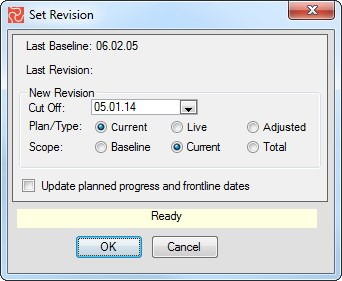
Then, select a cut-off date from the drop-down list. The revised plan is always set according to a previous cut-off date.
Specify Type
Safran Project allows you to use the current or the live plan to set your revised Schedule (the start and end dates of activities in your revised schedule).
I
f you choose the plan type current, Safran Project calculates the revised schedule using the current progress reporting (current dates). The current option represents a “mini-baseline.”
If you choose the live plan type, you will receive your live plan dates as revised dates. This option is an alternative for users who don't move the Timenow dates between baselines. Setting a revised schedule represents an “if we knew then(when we set the baseline) what we know today,“ which is what the Baseline would have been.
If you chose the plan, adjusted it, it amends, or change an existing revised schedule. If revised dates exist for the activity, then the revised dates are kept; if not, and if baseline dates exist are set for the activity, the revised dates are set to the baseline dates. Alternatively, if neither revised nor baseline dates exist, the revised dates are updated using the live dates (Early start, Early finish) for new activities.
Select Scope
You may choose baseline, current, or total scope as the basis for a revised schedule using the project Quantity definition. The definition of what scope is part of the baseline, current, or total scope is controlled by the scope configuration of the Project Properties
Press the OK button to start the set revision calculations.
Note that for any subsequent revisions, the type and scope options are set. Once specified, you have to run your revisions with identical options. If a change is required, you will have to annul your revisions.
Annul
Safran Project allows you to cancel the Set Revision option through an annulment option. Click on Annul in the PROJECT ribbon.
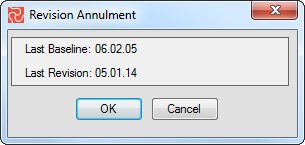
Any last revision may be annulled.