# System Attributes
Version: V26.0 (Beta)
Back to: Index
Overview
System Attributes is the first section in the Administration area and is typically the starting point for initial configuration. It contains all system-wide lookup lists and dropdown values used throughout Safran Risk Manager. Any values defined here are available across all projects within the organisation.
The page is divided into several different attribute sections, each containing a set of tabbed sub-categories.
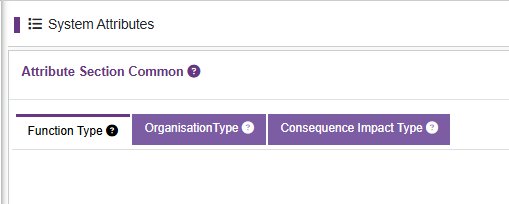
Attribute Section Common
This section contains attributes shared across the whole application.
| Tab | Description | Example Data |
|---|---|---|
| Function Type | Categorise user and risks by business function | Project Management, Quality Assurance, Software Engineering |
| Organisation Type | Classifies nodes in the business organisation structure | Head Office, Company Name, Country, Division, Business Unit, City Office |
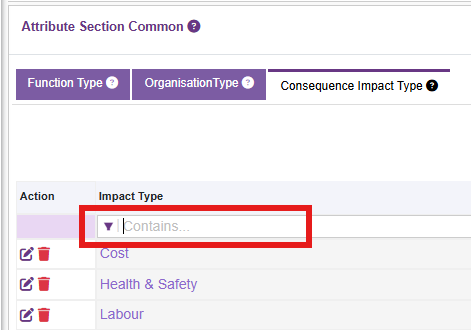
| Consequence Impact Type | Defines the categories of impact when assessing the risk | Cost CAPEX, Cost OPEX, Cost Material, Cost Labour, Time Delay Start, Time Delay Completion, Safety, Quality, Reputation, Customer Satisfaction |
Attribute Section Risk
This section contains attributes specific to risk records.

| Tab | Description | Example Data |
|---|---|---|
| Risk Type | Classifies risks with respect to assessment type | Standard, Estimate Uncertainty, Calendar |
| Risk Conclusion | Defines the possible conclusion states for a risk | Occurred, Did not occur |
| Risk Category | General multi-select categorisation | Legal, Economic, Environmental, Societal |
| Risk Breakdown | Specific risk categories for more formal classification | Technical, Organisation |
| Control Type | Types of controls that can be applied to risks | Prevent, Detect, Correct |
| Risk State | Categorisation of assessment state with respect to time | Current, Pre-treatment, Post-treatment, Target |
| Risk Element | Defines risk polarity type | Threat (negative consequence), Opportunity (positive consequence), Issue or Other |
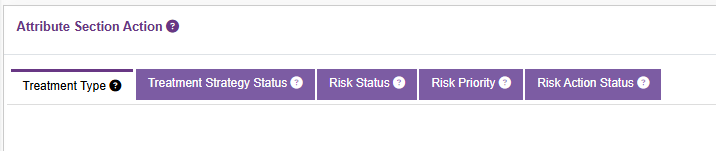
Attribute Section Action
This section contains attributes that apply to risk treatment actions.
| Tab | Description | Example Data |
|---|---|---|
| Treatment Type | Define the type of treatment the action achieves | Treat, Tolerate, Transfer, Terminate, Take |
| Treatment Strategy Status | Categorise the action current assessment | On Hold, Not Started, 50% Complete |
| Risk Status | Define the risk lifecycle status | Unapproved, Approved, Closed, Archived |
| Risk Priority | A subjective assessment of the risk priority | Low, Medium, High |
| Risk Action Status | Define the action lifecycle status | Not started, Underway, Closed, Archieved |
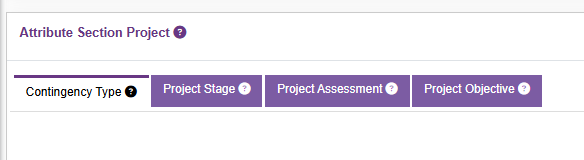
Attribute Section Project
This section contains project level attributes
| Tab | Description | Example Data |
|---|---|---|
| Contingency Type | Define the contingency budget type | Technical, Management |
| Project Stage | Define the project lifecycle stage or award type | Pre-contract, Post-contract, Internal Project |
| Project Assessment | Define the progress of the project | On Teack, Falling Behind |
| Project Objective | Categories for the project objectives | Strategic, Cash Flow, Reputation |
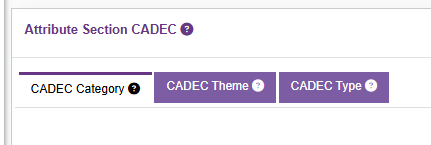
Attribute Section CADEC
This section contains changes, assumptions, dependencies, exclusions, constraints and other
| Tab | Description | Example Data |
|---|---|---|
| CADEC Category | Define the CADEC types | Change, Assumption, Dependency |
| CADEC Theme | Define the theme for the CADEC | Physical, Human, Internal Coordination |
| CADEC Type | Define the CADEC type | Variability, Ambiguity, Unknowable |
Adding a New Attribute Value
- Navigate to the relevant attribute section and tab.
- Click Add new (top right).
- Enter the required Title and Description fields (marked with *).
- Click Save.
Note: Deleting attribute values that are already in use across projects will cause data integrity issues. Always check usage before deleting.
Special Case Attribute Settings
In addition to the Title and Description, some attributes require additional values to be created.
| Section | Tab | Special Case | Example |
|---|---|---|---|
| Common | Impact Type | Requires the specific type of impact to be defined from dropdown | Cost, Time, Qualitative |
| Risk | Risk Type | Is Active flag | Tick=visible, No-tick=not visible |
| Risk | Risk Category | Parent ID indicates the hierarchical element. Leave as --select-- to keep at top parent level. Select the parent from the list to make a child | Parent name |
| Risk | Risk Breakdown | As risk category | |
| Risk | Risk State | Sort Order enables the states to be rearranged in order. Is principle indicates that this is the default state. Only one principle can be selected | 1,2,3 Tick=principle |
| Risk | Risk Element | Has positive impact (tick) indicates it is an opportunity. If unticked, it will be a negative (threat) impact | Tick=Opportunity, No-tick=Threat |
| Action | Treatment Type | When defining a treatment, select if it is associated with a positive or negative effect | threat or opportunity |
| Action | Risk Status | Select from the pre-defined risk status values in the dropdown to assign risk status. The status colour can be defined. Is Auto Rename will be able to define an alternative name if the risk is changed. Select the auto rename from the dropdown | If risk is "approved" and data changes, then auto rename can change the state to "changed" or "approved*" |
| Action | Risk Priority | The action status colour can be defined | red, blue |
| Action | Action Status | The defined action status is selected from the dropdown and its colour can be selected | Pending, Underway, Closed |
| Project | Project Assessment | Project assessment colour can be defined | red, blue |
| Project | Project Objective | A hierarchical parent-to-child value can be set. Leave as --select-- to retain as parent, or select the parent |
Editing and Deleting Values
Each row in the attribute tables includes two action icons:
| Icon | Action |
|---|---|
| ✏️ (pencil) | Edit the attribute value |
| 🗑️ (bin) | Delete the attribute value |
Use the Contains... filter fields at the top of each column to search for specific values within a large list.
Next:03- Organisation
Previous 01-introduction
Back To:00-Index