# Organisation
Version: V26.0 (Beta)
Back to: Index
Overview
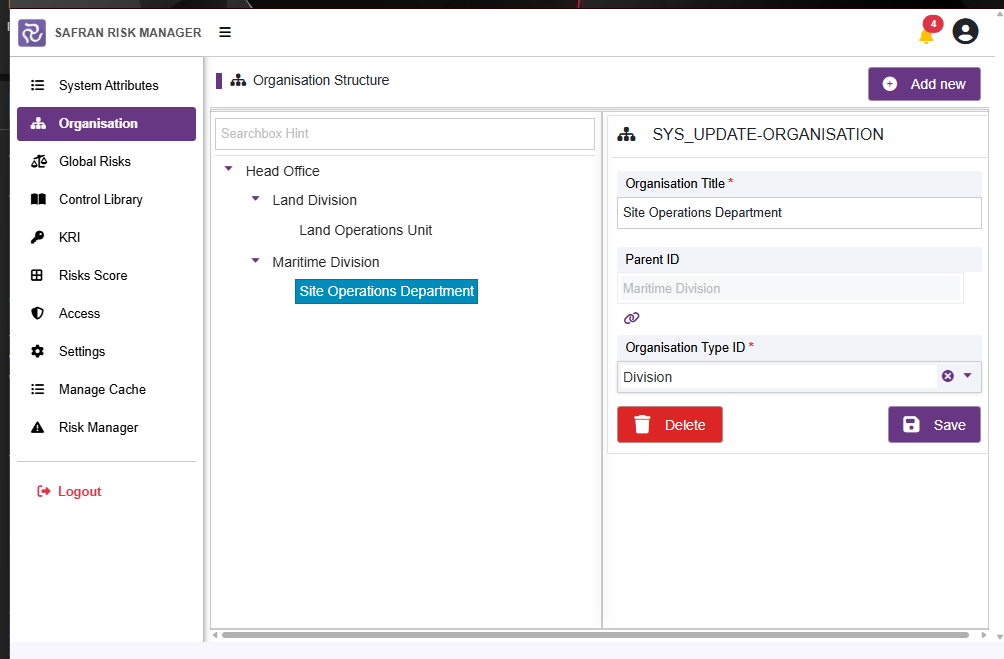
The Organisation section allows administrators to define and maintain the hierarchical organisational structure used within Safran Risk Manager. This structure is used to group projects and filter data across the application.
The page is split into two panels:
- Left panel: The organisation tree, showing the full hierarchy
- Right panel: The Add/Edit form for creating or modifying organisation nodes
Organisation Tree
The left panel displays the full organisation hierarchy as a collapsible tree. Each node can have child nodes beneath it, representing divisions, departments, or teams.
Example structure:
Head Office
├── Land Division
│   └── Land Operations Unit
└── Maritime Division
    └── Site Operations Department
Use the Searchbox Hint field at the top of the tree to filter and quickly locate a specific organisation node.
Adding a New Organisation Node
- Click Add new (top right of the page).
- The right panel displays the Add Organisation form.
- Complete the required fields:
| Field | Required | Description |
|---|---|---|
| Organisation Title | Yes (*) | The name of the organisation node |
| Parent ID | No | The parent node this organisation sits under. Use the link icon to browse and select. Leave blank for a top-level node |
| Organisation Type ID | Yes (*) | The type of organisation (drawn from Organisation Types in System Attributes) |
- Click Save to add the node to the tree.

Editing an Organisation Node
- Click on the organisation node title in the left-hand tree.
- The right panel switches to Edit Organisation mode, pre-populated with the node's current values.
- Make the required changes.
- Click Save.
Deleting an Organisation Node
Warning: Deleting an organisation node that has projects or risks assigned to it can cause data integrity issues. Ensure that the node is no longer in use before deleting.
- Click on the node in the tree to select it.
- A Delete button appears in the edit form.
- Click Delete and confirm the action.
Organisation Types
Organisation Types are defined in System Attributes → Organisation Type. These must be configured before organisation nodes can be created. Common examples include: Head Office, Division, Department, Unit.
Next: 04-global-risks
Previous: 02-system-attributes
Back to: 00-Index